


 Back to
Topics
Back to
Topics



Author-Maria Thompson

Last updated-Feb 14, 2026
In a world where business runs on technology, managing Information Technology (IT) services effectively becomes a necessity. Every task relies on systems, applications, networks, and digital tools. When those services fail, productivity drops, customers become frustrated, and revenue can quickly suffer.
But what if your IT systems could run more predictably, with fewer disruptions and faster resolutions? This is where IT Service Management (ITSM) works as a saviour. In this blog, we will explore What is ITSM, its core processes and practices to create a scalable IT environment. Let's get started!
What is IT Service Management (ITSM)?
IT Service Management (ITSM) refers to the structured approach organisations use to design, deliver, manage, and improve IT services. Instead of viewing IT as a collection of tools or technical fixes, ITSM treats it as a service that must consistently meet business needs.
ITSM ensures that every technology supports people, processes, and organisational objectives in a reliable and measurable way. Instead of reacting to problems as they arise, an IT Service Manager follows defined processes to prevent issues, manage changes smoothly, and maintain service quality

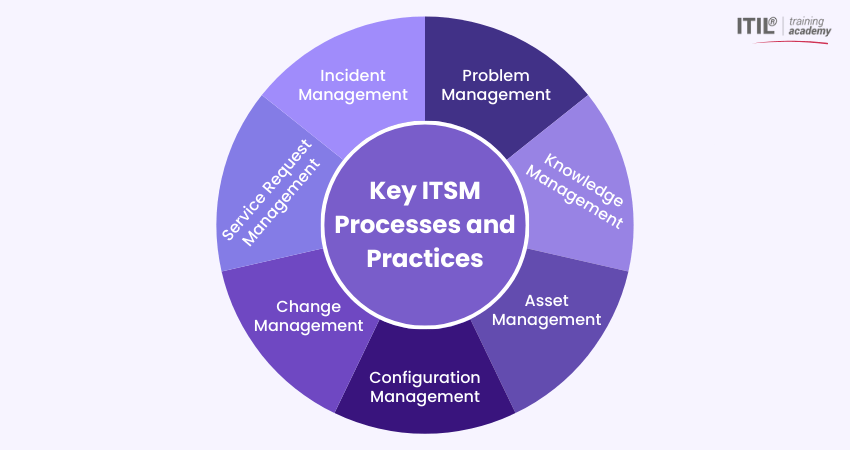
Key ITSM Processes and Practices
Effective ITSM is built around clearly defined processes. Each process serves a specific purpose but works together with others to create a stable, reliable, and efficient IT environment. Let us explore them below:
1) Problem Management
Problem Management focuses on identifying and eliminating the root causes of recurring IT service incidents. It focuses on providing long-term resolution to an issue by understanding why it happens. It analyses patterns, investigates underlying causes, and prevents issues from happening again.
Key Roles and Responsibilities:
1) Problem Manager:
Identify, document, and manage recurring problems.
2) IT Support Teams:
Assist in diagnosing issues and implement corrective actions.
3) Technical Analysts:
Analyse trends and patterns to identify underlying causes.
4) Quality Assurance Analyst:
Monitor problem resolution and verify fixes.
2) Knowledge Management
Knowledge Management ensures that useful information is documented, organised, and shared across teams. Every time an issue is resolved, the solution gets recorded in a knowledge base for future reference. This reduces reliance on individual expertise and promotes shared learning across teams.
Key Roles and Responsibilities:
1) Knowledge Manager: Oversee the knowledge base and manage ITIL Knowledge Management updates.
2) Service Desk Agents:
Document solutions and use knowledge articles to resolve incidents.
3) Subject Matter Experts:
Provide accurate technical content and review knowledge articles.
4) IT Support Teams:
Contribute troubleshooting guides and maintain documentation accuracy.
3) Asset Management
Asset Management or IT Asset Management (ITAM) involves tracking and managing all IT assets throughout their lifecycle. This includes hardware, software, servers, licences, and other technology resources. It ensures organisations know what they own, where it is located, and how it is being used.
Key Roles and Responsibilities:
1) IT Asset Manager:
Maintain asset inventory and oversee lifecycle management.
2) Procurement Team:
Manage purchasing, vendor coordination, and contract handling.
3) IT Operations Team:
Track asset usage and ensure proper deployment.
4) Compliance Officer:
Monitor licence compliance and regulatory requirements.
4) Configuration Management
Configuration Management maintains detailed information about Configuration Items (CIs) such as servers, applications, and networks, and how they are connected. These details are usually stored in a Configuration Management Database (CMDB). ITIL service Configuration Management helps maintain this configuration information so teams can understand dependencies, assess the impact of changes, and prevent unexpected service disruptions.
Key Roles and Responsibilities:
1) Configuration Manager:
Maintain the CMDB and ensure configuration accuracy.
2) System Administrators:
Update configuration records and manage technical changes.
3) IT Operations Team:
Verify configuration data and maintain system integrity.
4) Change Manager:
Ensure configuration updates align with approved changes.
5) Change Management
Change management ensures that updates and modifications to IT systems are introduced in a controlled and structured manner. Changes may include software updates, infrastructure upgrades, or policy adjustments. This process ensures that an update is reviewed, tested, approved, and communicated before it is implemented.
Key Roles and Responsibilities:
1) Change Manager:
Review change requests, assess risks, and manage approval processes.
2) Change Advisory Board (CAB):
Evaluate significant changes and provide approval decisions.
3) IT Operations Team:
Implement approved changes and monitor results.
4) Business Stakeholders:
Provide input on business impact and priorities.
6) Service Request Management
Service Request Management handles routine user requests in a structured and efficient manner. These requests are usually low risk and repetitive, such as password resets, access requests, software installations, or allocating hardware resources. Usually, these are standard and pre-approved tasks, aimed at improving user satisfaction and operational efficiency.
Key Roles and Responsibilities:
1) Service Desk Team:
Log, categorise, and fulfil service requests within agreed timelines.
2) Request Fulfilment Team:
Process standard and approved service requests.
3) IT Operations Team:
Provide technical support for request completion.
4) Approval Authority:
Review and approve requests that require security authorisation.
7) Incident Management
Incident management focuses on restoring normal services quickly when something goes wrong. An incident can be anything from a system outage to a login issue. The process usually includes logging the issue, categorising it, setting priority, resolving it, and closing it. A good Incident Management process reduces downtime and keeps users satisfied.
Key Roles and Responsibilities:
1) Incident Manager:
Oversee incident handling and ensure timely resolution.
2) Service Desk Agents:
Log and prioritise incidents.
3) Technical Support Teams:
Diagnose and resolve technical issues.
4) Service Owner:
Ensure service performance and review incident trends.
Benefits of Implementing ITSM
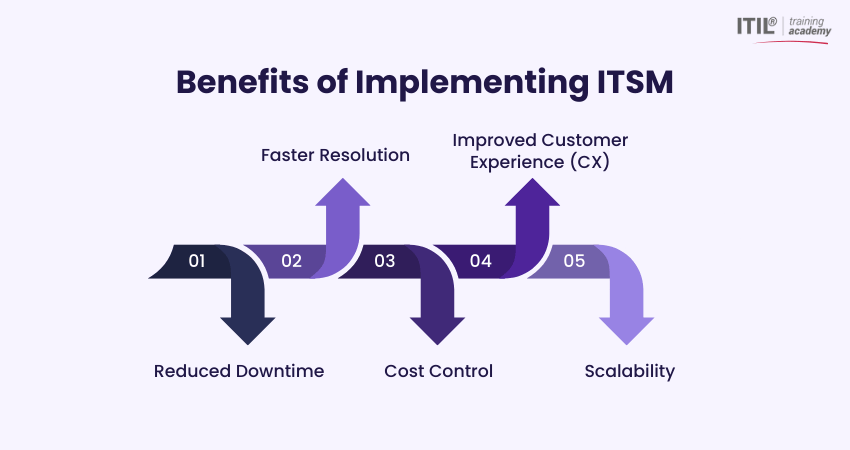
Implementing IT Service Management brings measurable improvements across an organisation. Below are the key benefits you can experience when adopting ITSM:
1) Reduced Downtime
Downtime in your IT services can disrupt business operations and impact revenue. ITSM minimises such downtime by introducing clear processes for incident, problem, and ITIL Change Management.
When issues occur, they are resolved quickly and systematically with their help. Additionally, recurring problems are identified and permanently fixed, which reduces repeated disruptions and improves overall system stability.
2) Faster Resolution
Defined workflows, automated ticketing systems, and documented knowledge bases enable faster issue resolution. Service desk teams know exactly how to handle different types of requests.
This structured approach eliminates confusion and reduces response times. This helps aim for quicker recovery, and improved productivity for employees and users. It also ensures consistent service delivery, as similar issues are handled using proven and standardised solutions.
3) Cost Control
ITSM helps organisations manage costs by improving resource utilisation and reducing waste. Asset Management ensures hardware and software are tracked properly with automation tools, preventing unnecessary purchases.
Additionally, preventing repeated incidents reduces emergency repair costs and unexpected expenses. Over time, IT spending becomes predictable and easier to manage. This financial visibility allows businesses to plan budgets and invest in improvements with confidence.
4) Improved Customer Experience (CX)
Reliable IT services directly influence customer satisfaction. When systems run smoothly and issues are resolved quickly, users experience fewer disruptions and they feel at ease using your services.
Clear communication during incidents and defined service levels also helps build customer trust and confidence. This leads to stronger relationships with both internal users and external customers.
5) Scalability
As organisations grow, their IT environments become more complex and require robust Service Management practices. ITSM provides a structured framework that supports expansion without losing control.
Standardised processes make it easier to add new users, systems, and services while maintaining service quality. This ensures IT can scale alongside business growth in a stable and organised manner.
Challenges in ITSM Implementation
Although ITSM offers many benefits, implementing it is not always straightforward. Understanding the relationship in ITSM vs ITIL can help organisations choose suitable practices and frameworks. Organisations may face several challenges during the process.
1) Resistance to Change
Employees may resist new processes, particularly if they are accustomed to informal or reactive approaches. Employees may feel that structured workflows limit flexibility. To overcome this, leaders can explain the benefits clearly and involve teams in the transition. When people see how ITSM reduces stress and confusion, they are more likely to accept it.
2) Tool Overload / Complexity
Many organisations invest heavily in ITSM tools without fully understanding their needs. If those tools are too complicated, teams may struggle to use them effectively. Therefore, it is important to choose tools that match the organisation’s size and needs. Simple and well-configured systems usually work better than overly complex ones.
3) Poor Process Mapping
Implementing ITSM without properly mapping existing processes can lead to confusion. Processes need to show real operational workflows rather than theoretical models. To fix this, you can assess current practices, identify gaps, and gradually introduce improvements. Skipping this step often results in misalignment and inefficiency.
4) Lack of Training
ITSM cannot succeed without proper training. Employees need to understand new roles, responsibilities, and tools associated with ITSM. For that, you can offer regular training sessions and clear documentation to help teams stay confident and consistent. Continuous learning also supports long-term improvement.
ITSM Maturity Model
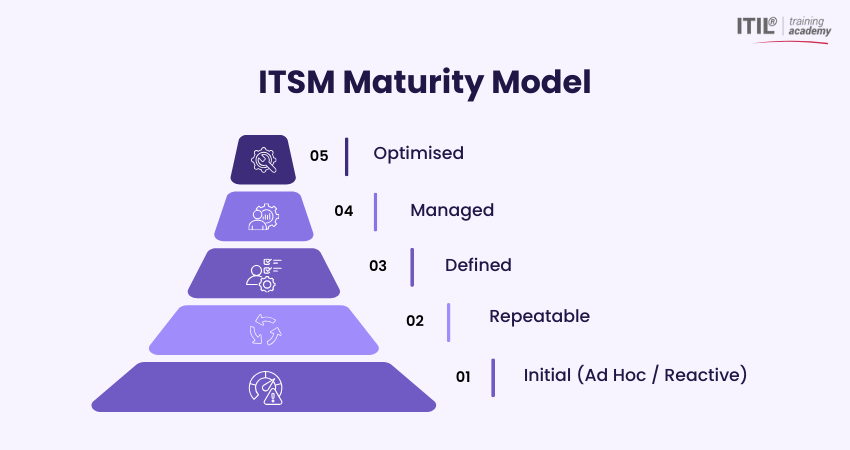
The ITSM maturity model measures how effectively an organisation manages its IT services. It typically progresses through several stages, ranging from reactive to optimised practices. Let's check those stages:
1) Initial (Ad Hoc / Reactive)
At this stage, IT processes are informal and unstructured. There is little documentation, and most issues are handled as they arise. Teams rely heavily on individual experience rather than defined workflows.
2) Repeatable
In the repeatable stage, some basic processes are introduced. Teams begin following similar steps when handling incidents or requests, even if those steps are not fully documented. Improvements are made, but they are not yet measured or fully controlled.
3) Defined
At this level, ITSM processes are clearly documented and standardised across the organisation. Roles and responsibilities are well defined, and employees are trained to follow consistent procedures. Tools such as ticketing systems and configuration management databases are often implemented to support structured service delivery.
4) Managed
In the managed stage, processes are not only defined but also monitored and measured regularly. Key Performance Indicators (KPIs) are used to evaluate service performance and identify areas for improvement. Here, IT begins to function as a reliable and strategic partner.
5) Optimised
The optimised stage represents the highest level of ITSM maturity. Processes are continuously reviewed and refined based on performance data and feedback. Here, IT is fully aligned with business strategy and actively contributes to innovation and growth. Continuous improvement becomes part of the organisational culture.
Conclusion
IT Service Management is a structured philosophy that ensures IT services deliver measurable value to the business. It introduces clear processes for handling incidents, managing changes, tracking assets, and improving services. When used correctly, ITSM helps build a stable, scalable, and future-ready IT environment. It turns IT into a dependable service that adds real value to the organisation.
Start your journey into structured ITSM with the
ITIL® Foundation Level Training
– Begin now!
Frequently Asked Questions?
The five stages of ITSM are based on the service lifecycle of ITIL. They lead organisations from planning services to improving them continuously. Those services include:
1) Service Strategy
2) Service Design
3) Service Transition
4) Service Operation
5) Continual Service Improvement
No, ITSM is not a Customer Relationship Management (CRM) tool. CRM systems manage customer data and sales activities. ITSM manages internal IT services and processes, while CRM tools manage customer relationships, sales, and support. ITSM focuses on service delivery; CRM focuses on customer engagement and experience.
ITSM is the overall practice of managing IT services within an organisation to ensure they support business objectives and user needs. ITIL is a widely recognised framework that provides structured best practices and guidance for implementing ITSM effectively. In short, ITSM is the practice, and ITIL is the framework that supports it.
Most Recent
Date - Aug 1, 2026
Date - Jul 18, 2026
Date - Jul 11, 2026