

 Back to
Topics
Back to
Topics



Author-Maria Thompson

Last updated-Jan 3, 2026
Is a forgotten password really as urgent as a system outage? Many IT teams still struggle to tell the difference. When every IT issue is treated the same, critical problems can be delayed while simple requests take up valuable time. This confusion often leads to longer downtime, frustrated users, and overworked support teams.
This is where understanding the difference between incidents and service requests becomes essential. Understanding Incident vs Service Request brings clarity to IT operations. It helps teams respond with the right priority, follow the correct process, and deliver faster, more reliable support. In this blog, you will explore how they differ and why proper classification is essential. Let’s dive in!
What is an Incident?
An Incident is something unexpected that breaks or slows down an IT service. It can be a complete outage, a partial failure, or even poor performance that stops users from working normally. The main aim when dealing with an Incident Request is to fix the issue quickly and bring the service back to normal.
Basically, these Incident Requests are not planned. They happen suddenly and usually need fast action because they affect work, customers, or business operations.
Incident Examples
Incidents can be big or small, but they all interrupt your normal work. Common examples include:
1) Email is not working across the company
2) A key business application is crashing during work hours
3) The internet or the network is going down in the office
4) The payroll system is not opening on the salary day
5) Online systems are becoming very slow for customers

What are Service Requests?
A Service Request is a formal request from a user for something new or for access to a standard service. It is not caused by failure. Instead, it is a normal and expected request for support, access, or resources. They are meant to enhance or enable users to work more effectively.
Service Requests are planned and repeatable. They usually follow fixed steps and are often listed in a service catalogue, so users know exactly what they can ask for.
Service Request Examples
Service Requests are part of everyday IT operations and are generally non-urgent. Examples for these scenarios include:
1) Requesting a new laptop or mobile device
2) Asking for access to a shared drive or business application
3) Resetting a forgotten password
4) Requesting software installation or upgrades
5) Onboarding support for a new employee

Incident vs Service Request: Key Difference
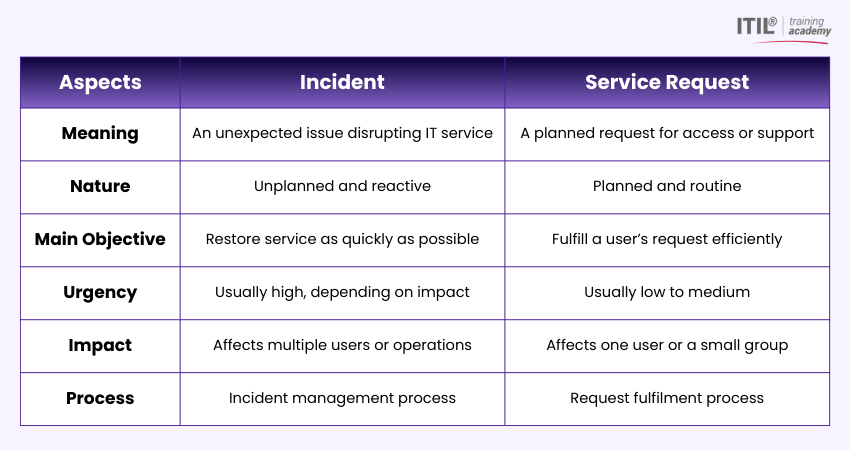
Although Incidents and Service Requests may look similar at first glance, they serve very different purposes. Let's check how they differ:
1) Purpose and Objective
The primary purpose of an Incident is to restore service as quickly as possible. The focus is on reducing downtime and limiting negative impact on users and the business.
A Service Request, on the other hand, aims to fulfil a user's needs. It is about providing access, information, or resources rather than fixing something that is broken. In simple terms, Incidents fix problems, while Service Requests deliver services.
2) Reduces Risks or Impact
Incidents often carry a high level of risk because they affect live services. If not resolved quickly, they can lead to lost revenue, compliance issues, or reputational damage.
In comparison to Incidents, Service Requests typically involve low risk. They are planned activities and rarely require urgent action or escalation. This is why Incidents are prioritised based on urgency and impact, while Service Requests are usually handled on a first-come basis within agreed timeframes.
3) Simplifies Reporting
Separating Incidents from Service Requests makes reporting clearer and more meaningful. Incident metrics focus on downtime, resolution time, and service reliability. On the other side, Service Request metrics focus on fulfilment time, volume, and user satisfaction.
When both are mixed together, reports become confusing and decision-making suffers. Clear categorisation helps organisations identify trends, allocate resources, and improve service quality over time.
4) Handling and Processes
Incidents follow an Incident Management process that includes logging, categorisation, prioritisation, investigation, resolution, and closure. The process is often dynamic, with escalation paths and on-call support.
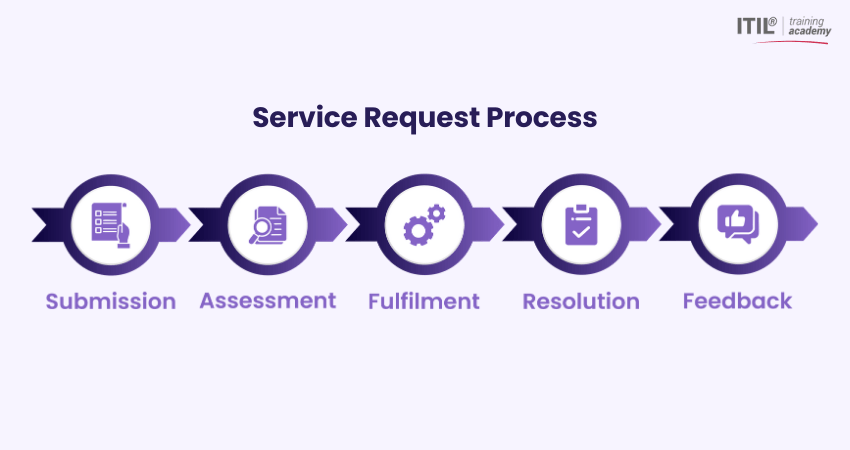
However, Service Requests follow predefined workflows. These workflows are usually documented, repeatable, and sometimes fully automated. Approvals, fulfilment steps, and completion criteria are clearly defined in advance.
Because of this, they are easier to manage at scale.
5) Level of Impact
Incidents are assessed based on how many users are affected and how critical the service is to the business. A single incident can impact an entire organisation.
Service Requests usually affect one user or a small group and do not disrupt existing services. This difference in impact is a key reason why incidents require stronger governance and faster response times.
Gain skills to align IT services with business expectations with ITIL® 4 Practitioner Service Level Management Training – Register today!
Best Practices for Handling Incidents and Service Requests
Using the right approach for both Incidents and Service Requests improves efficiency and user satisfaction. Here are the best practices that you can follow:
1) Define Clear Service Catalogues
A service catalogue is a structured list of all the IT services that an organisation offers to its users. It helps them understand what they can request and how to do it. Each request clearly explains what is included, who can request it, and how long it will take. This reduces confusion and prevents users from logging requests as incidents.
2) Use Intelligent Automation
Intelligent automation means using smart technology to handle tasks automatically. Also, automation helps reduce manual work. Simple Service Requests like password resets can be automated, saving time for both users and IT teams. You can also automate incidents by sending alerts, routing tickets, and suggesting solutions based on past issues.
3) Develop Comprehensive Knowledge Bases
A knowledge base is a central place where helpful information is stored and shared. It has articles, how-to instructions, troubleshooting steps, and FAQs that explain how to fix common problems or use IT services correctly. So, a good knowledge base helps IT teams fix incidents faster and allows users to solve simple problems on their own.
4) Define Appropriate SLAs
Service Level Agreements (SLAs) are formal agreements that define the level of service a user can expect from the IT team. Incidents usually have strict responses and resolution times based on urgency. Service Requests usually have more flexible timelines. Clear SLAs set expectations and reduce misunderstandings.
5) Offer Continuous Training
Regular training ensures that your IT support teams understand processes, tools, and communication standards. It also helps them correctly classify issues such as Incidents or Service Requests. To properly implement it, well-trained teams are required for better support.
6) Monitor and Optimise
Continuous improvement relies on regular tracking and analysis. Frequent checks on important metrics such as how quickly incidents are resolved, how often issues repeat, the number of Service Requests, and user feedback help things stay on track. Over time, this helps refine services and deliver a more reliable and efficient IT support experience.
Conclusion
Recognising the difference between Incident vs Service Request is key to delivering reliable and efficient IT support. Incidents demand a fast response to restore services and protect business operations. Service Requests focus on enabling users through structured, predictable fulfilment. When both are clearly identified and handled correctly, IT teams can prioritise better, reduce downtime, and improve overall service quality and user satisfaction.
Upgrade your ITSM knowledge through the ITIL® 4 Practice Manager (PM) Training – Start your journey now!
Most Recent
Date - Jan 6, 2026
Date - Jan 5, 2025
Date - Jan 6, 2026