

 Back to
Topics
Back to
Topics



Author-Maria Thompson

Last updated-Jan 3, 2026
In IT and cyber security, terms such as Events, Alerts, and Incidents are often used interchangeably, which can blur their true meaning. However, each plays a distinct role in how systems are monitored, issues are detected, and responses are triggered across IT operations.
When these signals are misunderstood, teams may miss early warnings or respond too slowly. So what actually separates Events from Alerts and Incidents? This blog explains the key differences between Events vs Alerts vs Incidents, helping you recognise what requires attention, what demands investigation, and what needs immediate action to keep systems secure and stable.
An Overview of Events, Alerts and Incidents
In IT operations, Events, Alerts, and Incidents represent different stages of system awareness and response. Events capture routine system activity and signals, Alerts highlight conditions that may require investigation, and Incidents confirm issues that disrupt services and demand immediate action.
For developers, DevOps teams, and IT and security professionals, understanding how these signals differ is essential for responding effectively. Managing them correctly helps reduce risk, protect services, and maintain organisational stability.

What are Events?
An Event refers to any occurrence within IT operations across systems, APIs, networks, processes, or workflows. Events are primarily generated automatically by monitoring tools, though some may be logged manually. They capture point-in-time data such as CPU usage, error rates, latency, traffic, or temperature, and are used to observe normal behaviour or detect changes within the environment.
What are Alerts?
An Alert signals that something needs investigation, even though it does not always require immediate action. Alerts are qualified Events where the monitoring logic identifies behaviour that may indicate a problem. Their purpose is to notify the appropriate on-call IT technical team so they can assess the situation.
Turn every service request into a seamless experience with our ITIL® 4 Practitioner: Service Request Management Certification - Register now!
What are Incidents?
An Alert signals that a condition requires investigation, although it does not always demand immediate action. Alerts are qualified events generated when monitoring logic detects behaviour that may indicate a potential issue. Their purpose is to notify the appropriate on-call IT teams so the situation can be assessed and addressed if necessary.
The Differences Between Events, Alerts, and Incidents
Here are the key differences between Events vs Alerts vs Incidents:
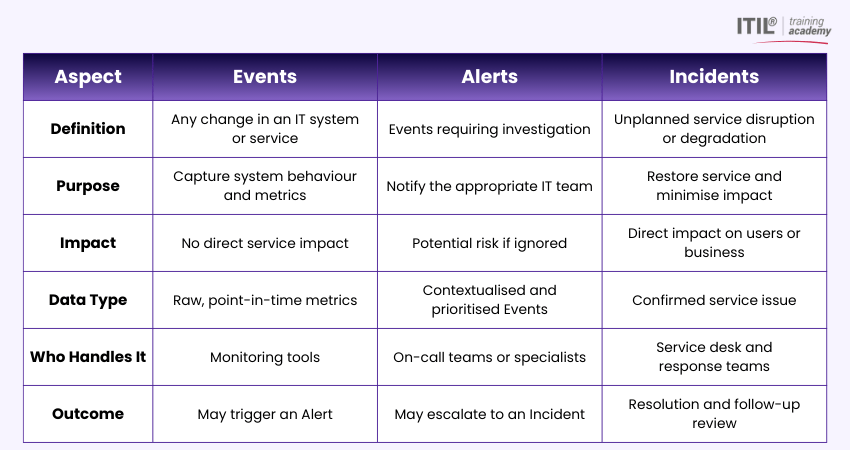
These examples further illustrate the distinctions between Events vs Alerts vs Incidents in IT operations:
Example 1: Storage Example
1) Event: The flash storage array detects an average read or write speed that exceeds its normal operating threshold. The monitoring system automatically logs this spike as unusual behaviour that may require attention.
2) Alert: The monitoring tool generates an Alert and flags the activity for review. An Administrator investigates the Alert, finds out that the spike was caused by a short-term workload increase and confirms that performance has returned to normal without intervention.
3) Incident: No Incident is raised, as IT Service performance is not affected. Since the issue was resolved naturally and posed no risk to services, it is recorded for reference only.
Example 2: E-commerce Example
1) Event: A customer encounters an error on the checkout page, while the IT system simultaneously records low available memory. Each issue is logged as a separate Event.
2) Alert: These related Events are analysed together, revealing that the system is running out of memory. Further analysis shows that insufficient memory is causing the checkout failures.
3) Incident: An Incident is raised immediately, as the issue directly affects customer experience and revenue generation. This triggers a priority response from the IT team to restore system stability and resolve the memory shortage quickly.
Your next IT career milestone starts here. Sign up for our range of ITIL® 4 Practice Manager (PM) Courses now!
How are Events, Alerts, and Incidents Created?
Now let’s explore the processes through which Events, Alerts and Incidents are created in IT operations. It'll help you further understand the differences between Events vs Alerts vs Incidents:
1) Events
1) Events are almost always system generated.
2) They come from monitoring and observability tools that continuously assess key IT performance metrics (latency, errors, traffic, saturation etc.).
3) When an external system detects something happening in your environment, it sends an Event.
4) Events don’t require a person to create them manually.
5) They’re captured automatically based on system behaviour.
2) Alerts
1) Alerts are also typically system-generated and are created when Events exceed preconfigured thresholds or rules.
2) IT monitoring tools evaluate Events against defined logic
3) When specific conditions are met (such as values outside safe limits), qualified Alert records are created.
4) Alerts signal possible issues and notify IT teams for investigation.
5) They can also originate through integrations, scripts or manual actions in exceptional cases.
3) Incidents
1) Incidents are created only when an issue is verified to affect IT operations and requires action.
2) In practice, Incidents often arise when a validated Alert is promoted to Incident status, either manually or automatically via rules.
3) However, Incidents can also be created manually by users or triggered through other channels (such as customer reports or integrations)
) This happens when degradation is detected outside IT monitoring systems.
Analytics for Events, Alerts, and Incidents
Analytics play a big role in IT operations management. Knowing how different analytics apply to Events, Alerts, and Incidents can help you maintain reliable IT systems. Here are the key analytics to consider:
1) Event Analytics: It focuses on detecting patterns and anomalies within large volumes of Event data. By correlating the data across IT systems, applications, databases, networks, and security sources, Event Analytics help uncover early warning signs.
2) Alert Analytics: This concentrates on analysing Alerts generated by monitoring and observability tools. These Alerts are triggered by defined conditions such as performance limits, security risks or IT system faults.
3) Incident Analytics: It involves analysing confirmed service disruptions that require resolution. These analytics support IT Service Management processes by identifying root causes, improving response effectiveness and driving continuous service and business alignment.
Best Practices to Manage Events, Incidents, and Alerts
Here are some best practices for managing Events, Alerts, and Incidents in IT services:
1) Set clear monitoring thresholds and parameters to detect anomalies early
2) Collect and analyse Events continuously to understand normal system behaviour
3) Ensure that the Alerts are relevant and aligned to real risks
4) Reduce Alert noise to prevent Alert fatigue for on-call teams
5) Define structured Incident response processes with clear roles
6) Categorise Incidents based on impact and urgency
7) Act quickly to minimise service disruption and business impact
Conclusion
Understanding the difference between Events vs Alerts vs Incidents is the foundation of effective IT operations. When teams know what to monitor, what to investigate and what demands immediate action, response becomes faster. Mastering this distinction helps build resilient systems and confident teams in an always-on digital world.
Learn how to manage, optimise and maximise value of your assets with our ITIL® 4 Practitioner: IT Asset Management Training - Sign up now!
Most Recent
Date - Jan 6, 2026
Date - Jan 5, 2025
Date - Jan 6, 2026